Free POS software for India, on any phone, tablet, or PC.
A real point-of-sale system for Indian retail. Scan the barcode, pick the customer, take the payment, print the receipt — from the device you already own. The kind of POS billing software typically sold as a paid subscription, included free with Wiseventory.
No special hardware. No per-counter fees.Updated: ~6 min read
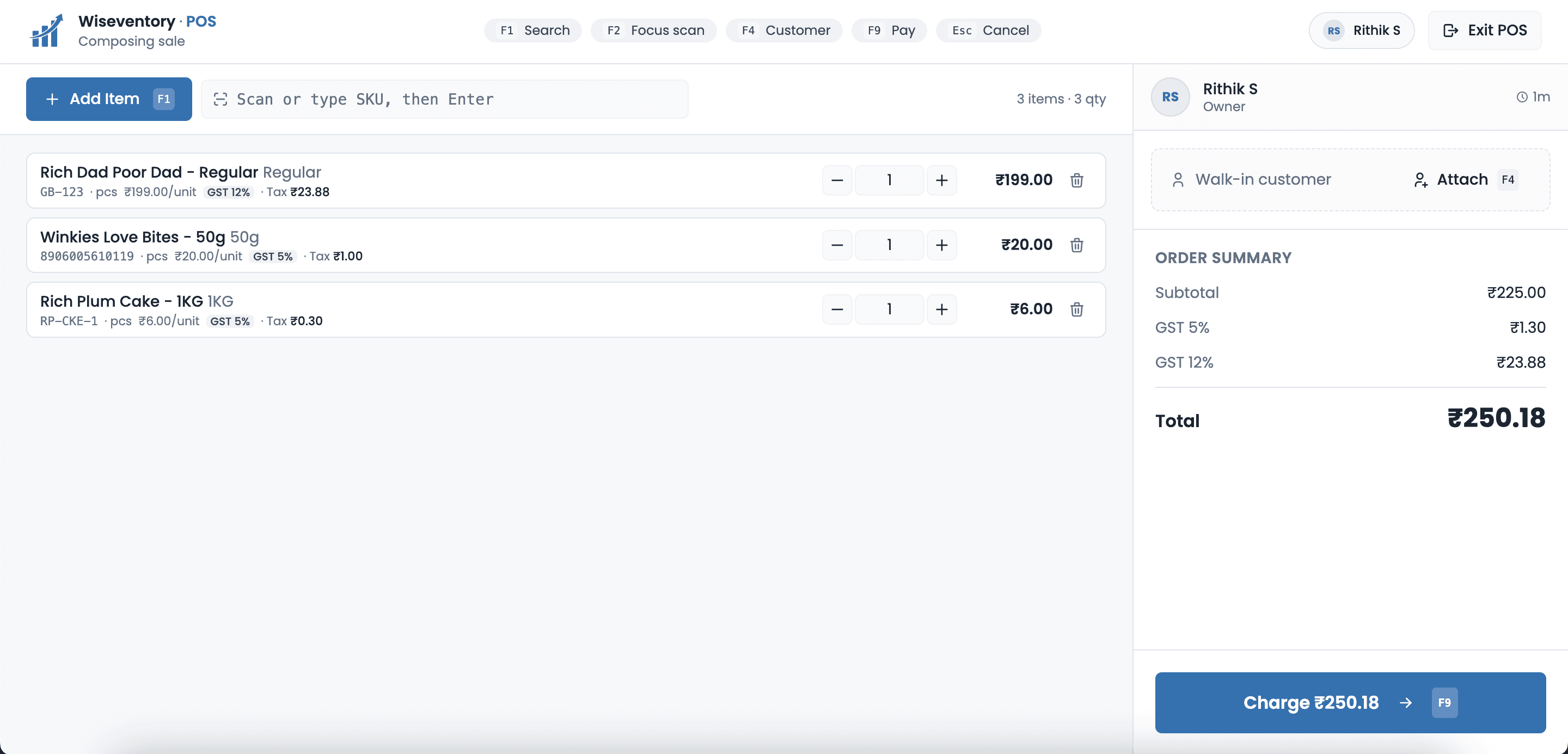
The actual Wiseventory POS interface: barcode scan, cart, GST breakdown, payment-mode selector.
From receipt book to a real counter. In one Diwali.
Lakshmi has run her clothing store in Mysuru for eight years. For seven of them, she billed the old way — duplicate-carbon receipt book, calculator, a quick mental check on whether the dupatta and the kurta added up to what she'd written on the tag.
The system worked. Mostly. Until the Diwali rush. Last October, on a Tuesday afternoon, the queue at her single counter snaked out to the road. Three customers walked away. Her daughter, home from college, watched for ten minutes, opened her laptop, and said: “Amma, you need a billing app.”
They tried Wiseventory the next morning. No card, no setup call, no salesperson on a follow-up. Lakshmi already had an Android tablet she watched movies on; her daughter paired a ₹1,500 USB barcode scanner and a ₹2,200 thermal printer from the hardware shop down the road.
By Saturday's evening rush, Lakshmi was billing in 30 seconds each — scan, total, UPI, print, next. A year later, her cashier handles the counter alone with a Cashier-only login. Lakshmi spends afternoons at the cloth wholesalers in Bangalore. The day's numbers are waiting on her phone by the time she gets home.
How POS billing works at the counter
Four actions cover 95% of an SMB's daily POS use.
Scan or search
Plug in any USB barcode scanner — most ₹1,500 ones from a hardware shop work out of the box. Or search by product name. The cart updates instantly with the right rate, the right HSN, and the right stock count.
Edit the cart
Bump the quantity. Apply a one-time discount. Override the price if dynamic pricing is on. Remove an item. Everything happens on one screen — no popups, no hunting for hidden buttons.
Take any payment, any combination
Cash, UPI, card, online — pick one or split across multiple. ₹500 cash + ₹1,000 on UPI? Allowed. Wiseventory calculates the change, records every mode, and keeps your daybook tidy.
Print and done
Thermal receipt, A4 invoice, or both. Bluetooth printer or USB. The receipt carries the GST breakdown, your shop logo, and a Razorpay pay link if the customer wants to settle later.
Cash, UPI and card on the same bill.
Indian retail doesn't happen in single payment modes. The customer pays ₹500 in cash because that's what was in their wallet, and the rest goes on UPI because they're short on the ATM run.
Most POS apps treat that as two transactions. Wiseventory treats it as one bill with two payments. Cleaner books, cleaner GSTR-1, fewer customer disputes.
- Any combination — cash + UPI, cash + card, all three on one bill
- Auto change calculation — type the cash amount, see the change
- Per-mode reference numbers — UPI transaction ID, card last 4, cheque number
Bill #INV-2026-0341 · Lakshmi's
Total Due
₹2,474
Split across
Cash
—
UPI
UPI-RZP-83291
POS software that runs on any phone, tablet, or PC
Same data, same login, same POS interface — whatever you happen to be holding.
Android & iOS phones
Bill on the move, run a pop-up stall, take orders at the customer's table. Pair a portable Bluetooth printer if you need a paper copy.
Tablets (iPad / Android)
The natural counter device. Big enough to scan-and-tap, small enough to hand to a customer for signing or reviewing the bill.
Windows & Mac PCs
Plug in a USB barcode scanner, plug in a thermal printer, you've built a full counter setup for under ₹5,000 in hardware.
No proprietary OS. No locked-down terminal. Wiseventory POS runs in the browser or as an app on hardware you already trust. If your phone breaks at 3 PM, you grab the tablet from the back. Sales don't stop.
Built in, not bolted on
POS sales flow into the same inventory, customer ledger, and GSTR-1 as everything else. No exports, no syncs, no reconciliation at month-end.
Stock check before sale
Sell only what you actually have. Wiseventory blocks oversells (or warns, if you prefer) before the customer pays.
Customer ledger updated
If the customer has a profile, the sale is added to their history and outstanding balance auto-adjusted.
Goes straight to GSTR-1
Every POS sale is GSTR-1 ready by construction. B2C-Small aggregation handled automatically by state and rate.
Built for any single-counter to multi-counter shop
The interface is the same; the data scales with you. Add cashiers, add counters, add branches.
Wiseventory POS vs typical paid POS subscriptions
The category, not a specific product. Individual paid POS apps differ — but most charge a recurring fee for the basics.
| Capability | Wiseventory | Typical paid POS |
|---|---|---|
| Recurring monthly fee | Free / included | Subscription based |
| Hardware required | Any phone, tablet, or PC | Often dedicated terminal |
| Multi-payment in one bill | Varies by product | |
| GSTR-1 ready output | Varies by product | |
| Cloud sync to inventory | Varies by product | |
| Stock validation before sale | Varies by product | |
| Salesperson tracking | Varies by product | |
| Per-counter/per-cashier fees | None | Often per-seat |
About this comparison: “Typical paid POS” refers to the general category of subscription POS products in India, not a specific named competitor. Capabilities of any specific product vary by plan. Spotted an inaccuracy? Email us and we'll review and update within 48 hours.
Frequently Asked Questions
Real questions from shop owners switching to Wiseventory.
Do I need special POS hardware to use this?
Will my barcode scanner work with Wiseventory POS?
How fast is the POS at peak hours?
Can my cashier see only the billing screen?
What about returns and refunds at the counter?
Multiple counters at the same shop — supported?
Does it work without internet?
Is the POS included in the free plan or do I need to pay?
“I billed customers with a paper book for seven years. My daughter set up Wiseventory on the tablet I already had — in less than an afternoon. By that Saturday I was finishing bills in 30 seconds. A year later my cashier handles the counter on her own and I get the day's numbers on my phone before dinner.”
Lakshmi Bhat
Clothing Store Owner · Mysuru, Karnataka
Related features
The pieces that come together at the counter.
Stop paying monthly for a billing counter
Sign up free, log in on the device you already have, scan your first product. The whole setup is faster than reading this page.